{UPDATE 03/09/14: If you come here looking for JMH related content start at the new and improved JMH Resources Page and branch out from there!}
Demonstrating use of JMH and exploring how the framework can squeeze every last drop out of a simple benchmark.
Writing micro benchmarks for Java code has always been a rather tricky affair with many pitfalls to lookout for:
- JIT:
- Pre/Post compilation behaviour: After 10K(default, tuneable via -XX:CompileThreshold) invocations your code with morph into compiled assembly making it hopefully faster, and certainly different from it's interpreted version.
- Specialisation: The JIT will optimise away code that does nothing (i.e. has no side effects), will optimise for single interface/class implementations. A smaller code base, like a micro-benchmark, is a prime candidate.
- Loop unrolling and OSR can make benchmark code (typically a loop of calls to the profiled method) perform different to how it would in real life.
- GC effects:
- Escape analysis may succeed in a benchmark where it would fail in real code.
- A buildup to a GC might be ignored in a run or a collection may be included.
- Application/Threading warmup: during initialisation threading behaviour and resources allocation can lead to significantly different behaviour than steady state behaviour.
- Environmental variance:
- Hardware: CPU/memory/NIC etc...
- OS
- JVM: which one? running with which flags?
- Other applications sharing resources
Here's a bunch of articles on Java micro-benchmarks which discuss the issue further:
- Robust Java Benchmarking
- The perils of benchmarking under dynamic compilation
- How to write a benchmark?(from StackOverflow)
- Read the footnotes of the JMH samples for further highlights on the topic.
Let's talk about JMH
JMH (Java Micro-benchmarks Harness or Juicy Munchy Hummus, hard to say as they don't tell you on the site) is the latest and as it comes out of the workshop of the very people who work hard to make the OpenJDK JVM fly it promises to deliver more accuracy and better tooling then most.The source/project is here and you will currently need to build it locally to have it in your maven repository, as per the instructions. Once you've done that you are good to go, and can set yourself up with a maven dependency on it.
Here is the project I'll be using throughout this post, feel free to C&P to your hearts content. It's a copy of the JMH samples project with the JMH jar built and maven sorted (see update below on current state of samples) and all that so you can just clone and run without setting up JMH locally. The original samples are pure gold in terms of highlighting the complexities of benchmarking, READ THEM! The command line output is detailed and informative, so have a look to see what hides in the tool box.
I added my sample on top of the original samples, it is basic (very very basic) in it's use of the framework but the intention here is to help you get started, not drown you in detail, and give you a feel of how much you can get out of it for very little effort. Here goes...
It's fun to have fun, but you've got to know how
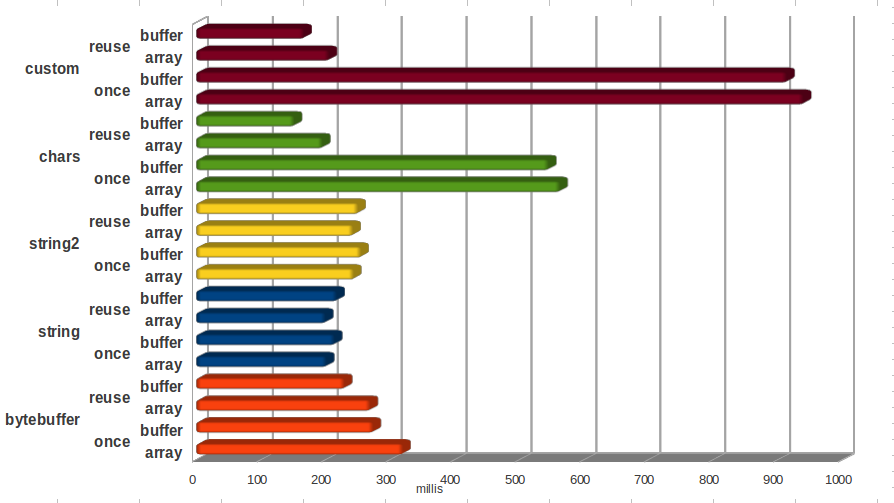
For the sake of easy comparison and reference I'll use JMH to benchmark the same bit of code I benchmarked with a hand rolled framework here and later on with Caliper here. We're benchmarking my novel way of encoding UTF-8 strings into ByteBuffers vs String.getBytes() vs best practice recommendation of using a CharsetEncoder. The benchmark compares the 3 methods by encoding a test set of UTF-8 strings samples.Here's what the benchmark looks like when using JMH:
 We're using three JMH annotations here:
- State - This annotation tells JMH how to share benchmark object state. I'm using the Thread scope which means no sharing is desirable. There are 2 other scopes available Group (for sharing the state between a group of threads) and Benchmark (for sharing the state across all benchmark threads).
- Setup - Much like the JUnit counterpart the Setup annotation tells JMH this method needs to be called before it starts hammering my methods. Setup methods are executed appropriately for your chosen State scope.
- GenerateMicroBenchmark - Tells JMH to fry this method with onions.
A lot of good tricks, I will show them to you, your mother will not mind at all if I do
To get our benchmarks going we need to run the generated microbenchmarks.jar. This is what we get:Nice innit?
Here's the extra knobs we get on our experiment for our effort:
- I'm using some command line options to control the number of iterations/warmup iterations, here's the available knobs on that topic:
- i - number of benchmarked iterations, use 10 or more to get a good idea
- r - how long to run each benchmark iteration
- wi - number of warmup iterations
- w - how long to run each warmup iteration (give ample room for warmup, how much will depend on the code you try and measure, try and have it execute 100K times or so)
- To choose which benchmarks we want to run we need to supply a regular expression to filter them or ".*" to run all of them. If you can't remember what you packed use:
- v - verbose run will also print out the list of available benchmarks and which ones were selected by your expression
- l - to list the available benchmarks
- If you wish to isolate GC effects between iterations you can use the gc option, this is often desirable to help getting more uniform results.
- Benchmarks are forked into separate VMs by default. If you wish to run them together add "-f 0" (you shouldn't really do this unless you are trying to debug something... forking is good). The framework also allows you to run several forks for each benchmark to help identify run to run variance.
- Make it easy to write benchmarks
- Integrate with my build tool
- Make it easy to run benchmarks (there's IDE integration on the cards to make it even easier)
- Give me output in a format I can work with
I'm particularly happy with the runnable jar as a means to packaging the benchmarks as I can now take the same jar and try it out on different environments which is important to my work process. My only grumble is the lack of support for parametrization which leads me to use a system property to switch between the direct and heap buffer output tests. I'm assured this is also in the cards.
Covering the lot exceeds the scope of this blog post, let's focus on obvious ones that might prove helpful for this experiment. Running with the gc and hs_gc profiler (note: this should be done with fixed heap for best result, just demonstrating output here) give this output:
The above supports the theory that getBytes() is slower because it generates more garbage than the alternatives, and highlights the low garbage impact of custom/charset encoder. Running with the stack and hs_rt profilers gives us the following output:
What I can read from it is that getBytes() spends less time in encoding then the other 2 due to the overheads involved in getting to the encoding phase. Custom encoder spends the most time on on encoding, but what is significant is that as it outperforms charset encoder, and the ratios are similar we can deduce that the encoding algorithm itself is faster.
 'What more?' you ask, well... there's loads more functionality around multi threading I will not attempt to try in this post and several more annotations to play with. In a further post I'd like to go back and compare this awesome new tool with the previous 2 variations of this benchmark and see if, how and why results differ...
Many thanks to the great dudes who built this framework of whom I'm only familiar with Master Shipilev (who also took time to review, thanks again), they had me trial it a few months back and I've been struggling to shut up about it ever since :-)
Related JMH posts:
UPDATE (1/07/2014): The samples repository has been updated to reflect JMH progress, sample code may have minor differences from the code presented above and command line options may differ. I will follow up at some point with a re-vamp of JMH related posts but for now you can always reproduce above results by reviving the older code from history.
I will show you another good game that I know
There's even more! Whenever I run any type of experiment the first question is how to explain the results and what differences one implementation has over the other. For small bits of code the answer will usually be 'read the code you lazy bugger' but when comparing 3rd party libraries or when putting large compound bits of functionality to the test profiling is often the answer, which is why JMH comes with a set of profilers:- gc: GC profiling via standard MBeans
- comp: JIT compiler profiling via standard MBeans
- cl: Classloader profiling via standard MBeans
- hs_rt: HotSpot (tm) runtime profiling via implementation-specific MBeans
- hs_cl: HotSpot (tm) classloader profiling via implementation-specific MBeans
- hs_comp: HotSpot (tm) JIT compiler profiling via implementation-specific MBeans
- hs_gc: HotSpot (tm) memory manager (GC) profiling via implementation-specific MBeans
- hs_thr: HotSpot (tm) threading subsystem via implementation-specific MBeans
- stack: Simple and naive Java stack profiler
Covering the lot exceeds the scope of this blog post, let's focus on obvious ones that might prove helpful for this experiment. Running with the gc and hs_gc profiler (note: this should be done with fixed heap for best result, just demonstrating output here) give this output:
The above supports the theory that getBytes() is slower because it generates more garbage than the alternatives, and highlights the low garbage impact of custom/charset encoder. Running with the stack and hs_rt profilers gives us the following output:
What I can read from it is that getBytes() spends less time in encoding then the other 2 due to the overheads involved in getting to the encoding phase. Custom encoder spends the most time on on encoding, but what is significant is that as it outperforms charset encoder, and the ratios are similar we can deduce that the encoding algorithm itself is faster.
But that is not all, oh no, that is not all
The free functionality does not stop here! To quote Tom Waits:
It gets rid of your gambling debts, it quits smoking
It's a friend, and it's a companion,
And it's the only product you will ever need
Follow these easy assembly instructions it never needs ironing
Well it takes weights off hips, bust, thighs, chin, midriff,
Gives you dandruff, and it finds you a job, it is a job
...
'Cause it's effective, it's defective, it creates household odors,
It disinfects, it sanitizes for your protection
It gives you an erection, it wins the election
Why put up with painful corns any longer?
It's a redeemable coupon, no obligation, no salesman will visit your home
It's a friend, and it's a companion,
And it's the only product you will ever need
Follow these easy assembly instructions it never needs ironing
Well it takes weights off hips, bust, thighs, chin, midriff,
Gives you dandruff, and it finds you a job, it is a job
...
'Cause it's effective, it's defective, it creates household odors,
It disinfects, it sanitizes for your protection
It gives you an erection, it wins the election
Why put up with painful corns any longer?
It's a redeemable coupon, no obligation, no salesman will visit your home
.jpg) 'What more?' you ask, well... there's loads more functionality around multi threading I will not attempt to try in this post and several more annotations to play with. In a further post I'd like to go back and compare this awesome new tool with the previous 2 variations of this benchmark and see if, how and why results differ...
'What more?' you ask, well... there's loads more functionality around multi threading I will not attempt to try in this post and several more annotations to play with. In a further post I'd like to go back and compare this awesome new tool with the previous 2 variations of this benchmark and see if, how and why results differ...Many thanks to the great dudes who built this framework of whom I'm only familiar with Master Shipilev (who also took time to review, thanks again), they had me trial it a few months back and I've been struggling to shut up about it ever since :-)
Related JMH posts:
- Benchmarking Multi-Threaded code with JMH
- Using JMH to benchmark performance counters
- Using JMH to benchmark Queue latency
UPDATE (1/07/2014): The samples repository has been updated to reflect JMH progress, sample code may have minor differences from the code presented above and command line options may differ. I will follow up at some point with a re-vamp of JMH related posts but for now you can always reproduce above results by reviving the older code from history.